
July 22, 2026
What Is MCP? How AI Chatbots Can Actually *Operate* Your Business Systems (2026 Guide)
"We deployed a chatbot, but it can only answer FAQs." That's the wall most companies hit. In 2026, the technology breaking through that wall is MCP — the Model Context Protocol.
This guide explains what MCP is without the jargon, how it differs from FAQ-style chatbots, what it enables in practice, and how to set it up.
MCP in 30 Seconds
MCP (Model Context Protocol) is an open standard that lets AI connect safely to external systems and data. Anthropic released it in November 2024; OpenAI, Google, and Microsoft have since adopted it.
The common analogy: "USB-C for AI."
- Before USB-C: every device needed its own cable
- After USB-C: one standard connects everything
Likewise, before MCP, every AI-to-system connection required custom development. With MCP, any system exposing an MCP server can be connected to any compliant AI the same way.
Why MCP Matters Now
Traditional AI chatbots have a structural limit: they can only answer what they already know. A RAG chatbot answers accurately from the documents you feed it — but "Is 3 PM tomorrow available?" or "Where's my order?" require live data lookups, and no document contains those answers.
MCP fixes this. Mid-conversation, the chatbot recognizes "this question belongs to the booking system," queries it directly, and folds the result into its reply. The chatbot evolves from an answer desk into an execution layer.
How MCP Works: Three Actors
| Actor | Role | Example |
|---|---|---|
| AI chatbot (MCP client) | Understands the conversation, decides which tool to call | OneBot |
| MCP server | Exposes a system's functions to AI as "tools" | Booking system's MCP server |
| Tools | Individual functions the MCP server provides | "Check availability," "Create reservation" |
The flow: user asks → AI decides a tool is needed → calls the MCP server tool → gets the result → replies in natural language. This decision-execution cycle is called the agent loop — the AI autonomously chains tools until it reaches an answer.
FAQ Chatbot vs. MCP-Enabled Chatbot
| FAQ / RAG chatbot | MCP-enabled chatbot | |
|---|---|---|
| Can answer | Documented knowledge | Knowledge + live data |
| "Any openings today?" | ❌ Not in documents | ✅ Queries the booking system |
| "Where's my order?" | ❌ Generic policy only | ✅ Pulls status from order system |
| Writing to systems | ❌ Impossible | ✅ Via tools |
| Adding integrations | Custom development | Register an MCP server |
Crucially, MCP adds to RAG rather than replacing it: RAG handles your knowledge base (manuals, policies, FAQs); MCP handles live queries and actions. Together they cover the bulk of customer-service traffic.
What MCP Enables in Practice
- Bookings & scheduling — "Any slots this week?" → answered live from your booking system
- Inventory & product info — "Is this in stock in size M?" → real-time stock lookup
- Order & delivery status — pulled from your order management system
- CRM logging — inquiries and lead details recorded automatically
- Internal helpdesk — "How many vacation days do I have left?" → HR system lookup
Prerequisite: the target system offers an MCP server (or an MCP-compatible API bridge). Official and community MCP servers for major SaaS products are multiplying fast.
Setting Up MCP in OneBot — No Code Required
OneBot ships MCP integration as a standard feature (released July 2026). Setup happens in the admin dashboard:
- Open your project's Integrations tab
- Click Add MCP Server and enter the server URL
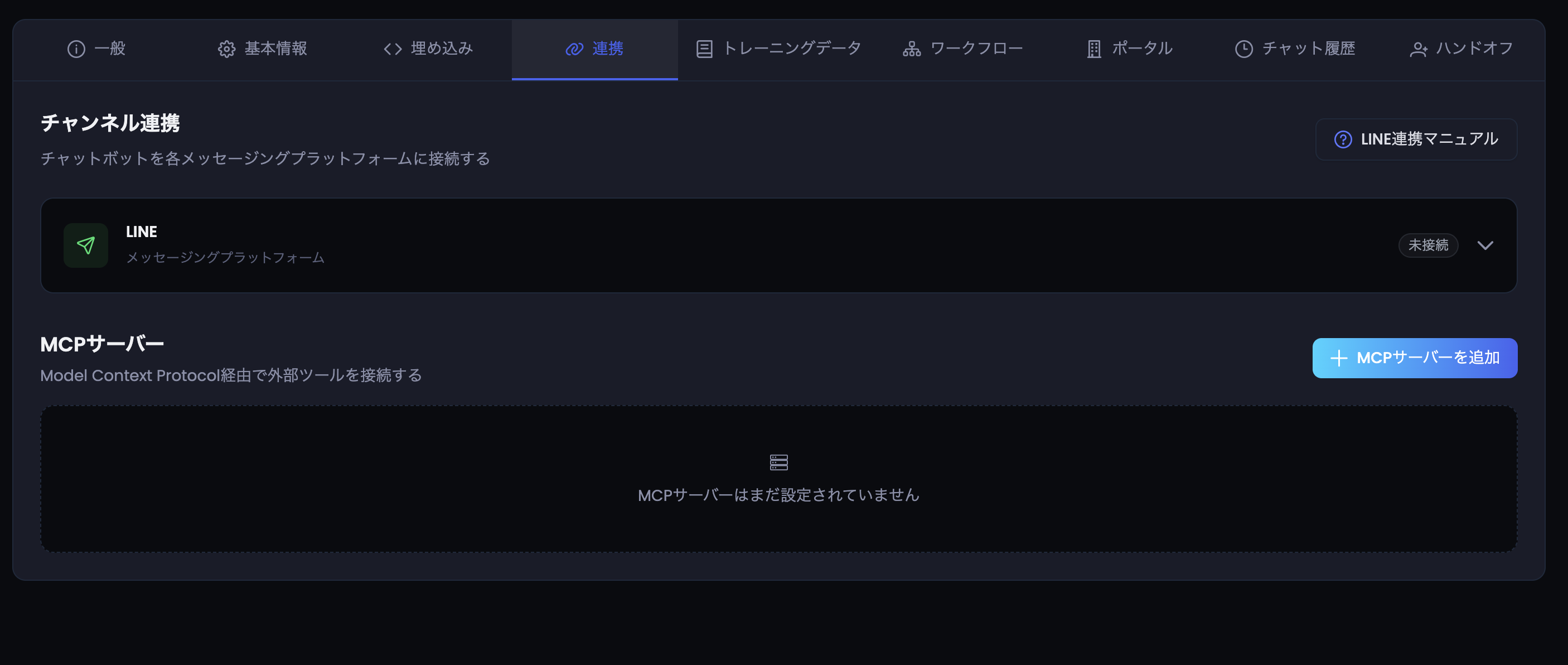
The Integrations tab: MCP servers sit alongside the LINE channel — added with no code.
- Choose authentication (none / header auth / OAuth 2.0)
- Test the connection — available tools are discovered automatically
- Enable it; the chatbot starts using tools mid-conversation on its own
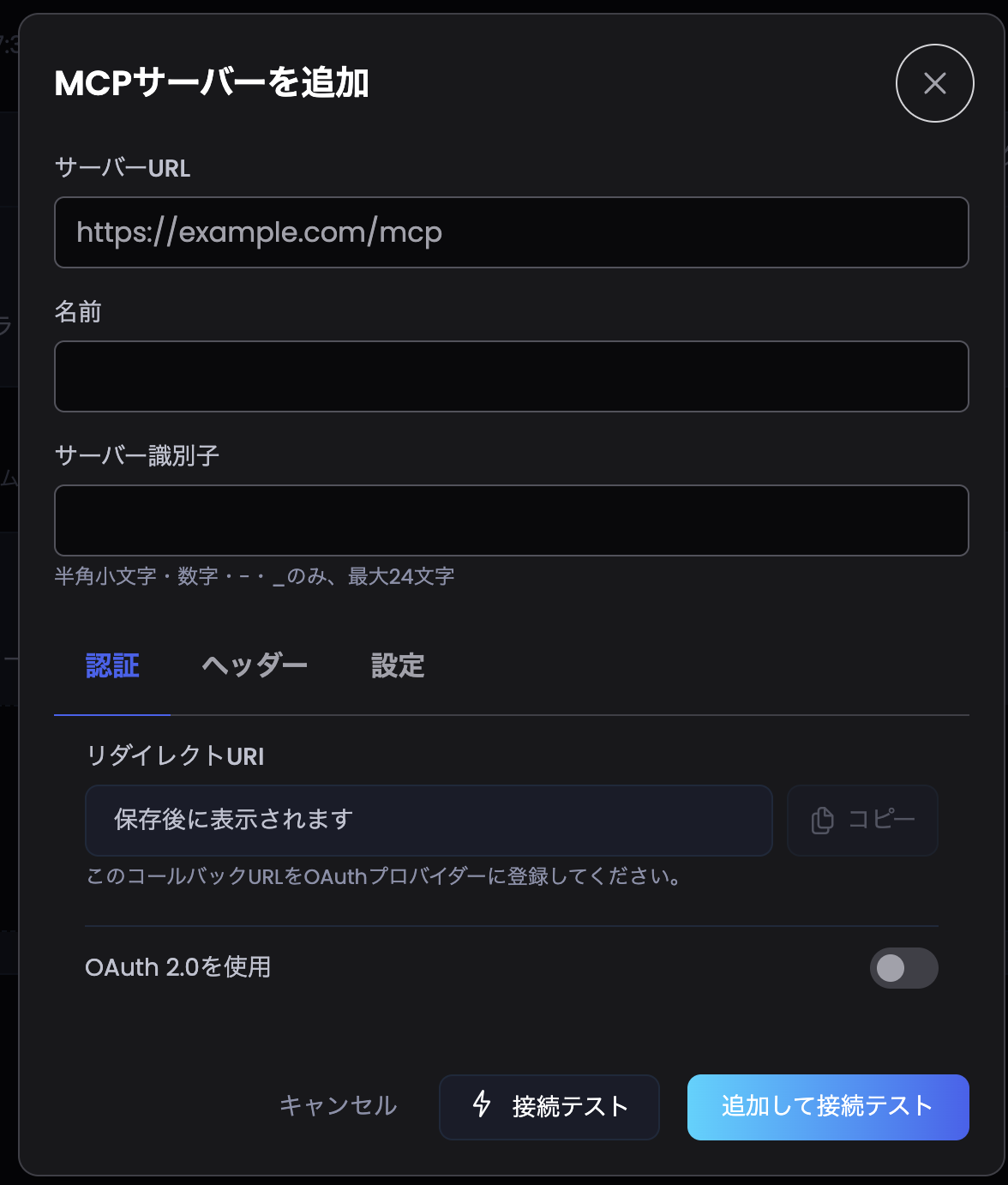
The Add MCP Server dialog. With OAuth 2.0 enabled, a redirect URI is issued automatically, and "Test connection" verifies reachability before saving.
Built-in guardrails:
- Up to 5 MCP servers per project, 50 tools per server
- Max 5 tool executions and a 25-second budget per conversation turn (no runaway loops)
- All AI usage from tool calls is metered and visible in your cost dashboard
Is It Secure?
"A chatbot operating internal systems" rightly makes IT teams pause. OneBot's MCP integration implements OAuth 2.0 with PKCE, strict server-URL validation, and connection timeout controls — multiple defensive layers. All data is processed on servers located in Japan, supporting APPI-compliant operation.
For a dedicated deep-dive on MCP security architecture, see MCP security: OAuth, PKCE and SSRF protection.
FAQ
Q1. How is MCP different from an API?
An API is a system-specific interface requiring custom integration work each time. MCP is a shared standard for AI-to-system connections — any MCP server connects to any compliant AI the same way.
Q2. Do we need to build anything?
Not if the system you want already has an MCP server — in OneBot it's URL + auth settings in the dashboard. For proprietary systems, an MCP server needs to be stood up (we can advise).
Q3. Do we have to replace our FAQ chatbot?
No — it's an extension. OneBot runs RAG (document-based answers) and MCP (system integration) side by side.
Q4. Which systems can we connect?
Anything exposing an MCP server over HTTP: booking, inventory, CRM, internal databases. Header auth and OAuth 2.0 are supported.
Q5. What stops the AI from doing something destructive?
It can only invoke registered tools, within hard execution and time limits — and every tool call is logged and auditable in the dashboard.
Q6. What does it cost?
MCP integration is part of OneBot. Tool-call AI usage is metered like normal messages and always visible in the dashboard. Details available in your trial.
Beyond FAQs
- MCP is the open standard connecting AI chatbots safely to business systems
- It upgrades chatbots from "answering" to "doing" — lookups, status checks, records
- OneBot includes MCP as standard: no-code setup, hosted on servers in Japan
Try everything free for 14 days — no credit card required.
Related articles
- RAG Chatbot Comparison Japan 2026: 5 Platforms Ranked for LINE & APPI ComplianceRAG chatbot comparison Japan 2026: 5 platforms ranked on LINE native integration, APPI data residency, accuracy, and deployment speed.
- How RAG Chatbots Eliminate AI HallucinationsLearn why RAG (Retrieval-Augmented Generation) chatbots answer only from your data — and how this prevents the hallucination problem that plagues generic AI chatbots.
- APPI × AI Chatbot: A Data Residency Compliance Guide for Japanese EnterprisesAPPI compliance guide for Legal Officers and CTOs: 12-point vendor checklist, evaluation rubric, and 6-step playbook for AI chatbot data residency in Japan.
- Enterprise RAG vs. ChatGPT for internal document search in Japan (2026)A practical comparison of dedicated RAG vs. ChatGPT Enterprise, Copilot, and Gemini for internal document search — covering TCO, APPI data residency, source citation, and a decision framework for Japanese enterprise CTOs.